
 English



















































































































































































































































































































































































































![swimsuit edition [abbb] - 1.20 21 swimsuit edition - chapter](https://mymagazine.blog/wp-content/uploads/2025/09/swimsuit-edition-abbb-1.20-21-swimsuit-edition-chapter1-1024x574.webp)





TM SIM Registration 2026 – Complete Step-by-Step Guide


If you’re using a TM SIM, registration is mandatory. The Philippine government requires all SIM cards to be registered to prevent scams, fraud, and illegal activities. TM operates under Globe Telecom, so the SIM registration process is handled through Globe’s official system.
From my experience, most users struggle not because the process is difficult—but because they don’t know the exact steps or required documents. This guide keeps things simple and practical so you can register your TM SIM without confusion.
What is TM SIM Registration
TM SIM registration is the process of linking your SIM card to your personal identity. Once registered, your number becomes verified and fully active.
Without registration:
- Your SIM may get deactivated
- You won’t be able to call, text, or use data
Why TM SIM Registration is Important
Here’s why it matters:
- Helps prevent scams and spam messages
- Protects your SIM from unauthorized use
- Keeps your number active and usable
- Required by law in the Philippines
Requirements for TM SIM Registration
Before starting, make sure you have:
1. Active TM SIM
Your SIM must be inserted and working.
2. Valid ID
You can use:
- National ID
- Passport
- Driver’s License
- Voter’s ID
3. Personal Details
- Full name
- Date of birth
- Address
4. Selfie Photo
A clear selfie for identity verification
How to Register TM SIM (Step-by-Step)
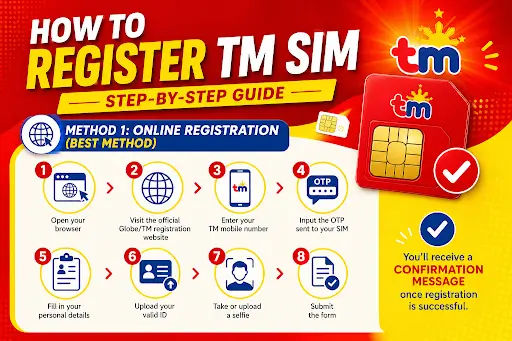
Method 1: Online Registration (Best Method)
- Open your browser
- Visit the official Globe/TM registration website
- Enter your TM mobile number
- Input the OTP sent to your SIM
- Fill in your personal details
- Upload your valid ID
- Take or upload a selfie
- Submit the form
👉 You’ll receive a confirmation message once registration is successful.
Method 2: Register via GlobeOne App
- Download the GlobeOne app
- Log in using your TM number
- Go to SIM registration section
- Fill in your details
- Upload ID and selfie
- Submit
This method is easier if you prefer mobile apps.
Method 3: In-Store Registration
If online registration is difficult:
- Visit a Globe store or authorized retailer
- Bring your valid ID
- Staff will assist you with registration
TM SIM Registration Deadline
SIM registration usually has a deadline set by the government. If you miss it:
- Your SIM may be permanently deactivated
- You could lose your number
👉 Always register as early as possible.
Common Problems and Fixes
OTP Not Received
- Check signal
- Restart phone
- Try again after a few minutes
Upload Error
- Make sure image is clear
- Use supported formats (JPG/PNG)
Invalid ID Issue
- Double-check ID details
- Use a different valid ID if needed
Slow Website
- Try during non-peak hours
- Use a stable internet connection
Tips for Successful Registration
- Use a clear and readable ID photo
- Ensure your selfie matches your ID
- Double-check all details before submitting
- Keep a screenshot of confirmation
Frequently Asked Questions
Is TM SIM registration free?
Yes, registration is completely free.
Can I register multiple SIMs?
Yes, but each SIM must be registered separately.
What happens if I don’t register?
Your SIM will be deactivated and unusable.
Can I update my details later?
Yes, you can update through official channels if needed.
Final Conclusion
TM SIM registration is simple but extremely important. It protects your number, ensures uninterrupted service, and keeps you compliant with government regulations. Whether you choose online registration, app method, or in-store assistance, the process only takes a few minutes.
If you follow the steps correctly, you’ll avoid errors and complete your registration smoothly.