English































































































































































































































































































































































































































![swimsuit edition [abbb] - 1.20 21 swimsuit edition - chapter](https://mymagazine.blog/wp-content/uploads/2025/09/swimsuit-edition-abbb-1.20-21-swimsuit-edition-chapter1-1024x574.webp)





Best Value 3D Printers $500–$1000: Performance vs Price

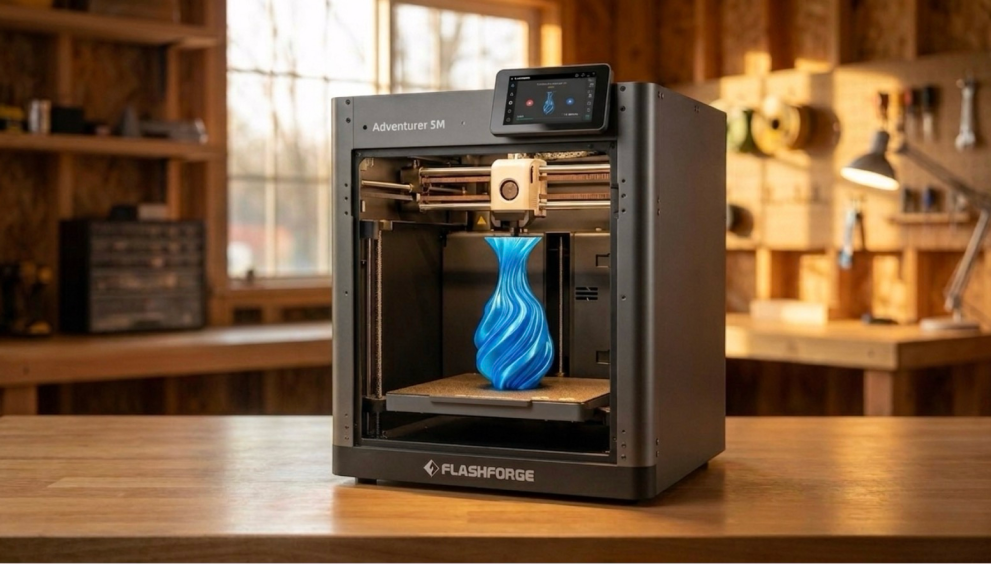
In the $500 to $1,000 price range, the truly competitive 3D printers are FDM models that balance high speed, structural rigidity, long-term maintenance costs, and material flexibility. This article focuses specifically on FDM 3D printers in the $500–$1,000 bracket. Using real data and typical use cases, we will help you define the true boundaries of value for your money.
Performance vs Price: What Defines True Value in Mid-Range 3D Printers
Based on user feedback, FDM 3D printers in the $500–$1,000 range usually include auto-leveling, stable motion architectures, and functional slicing ecosystems. Compared to entry-level models, avoiding a few critical mission failures each month often provides more psychological and economic value than gaining a few extra millimeters of build volume on paper.
Speed vs Consistency: Why Faster Isn’t Always Better
In community discussions, many people are drawn to advertised speeds of 600 mm/s, only to face layer shifts and lost detail during their first long print. Reviews of mid-range high-speed FDM models consistently prove that without a rigid structure and vibration compensation, top speeds are rarely usable for daily quality presets.
Take the high-performance CoreXY architecture we know well as an example. The Flashforge Adventurer 5M Pro has a rated top speed of 600 mm/s. However, the recommended speed for high-quality printing is actually around 300 mm/s. Combined with a 20,000 mm/s² acceleration and an extrusion flow of 32 mm³/s, this range keeps outlines sharp and maintains stability during overnight prints. For many, finding the best budget 3d printer means looking for the machine where the success rate stays above 90% even when you run back-to-back jobs every day.
To make this clearer, here is a simplified data comparison:
| Speed Strategy | Common Print Speed Range | Typical Success Rate Estimate | Target Audience |
| Extreme High-Speed Tuning | 400–600 mm/s | Approx. 70% | Enthusiasts who enjoy constant tuning |
| Stable Mid-to-High Speed Preset | 200–300 mm/s | Approx. 90–95% | Studios and businesses pursuing turnaround times |
| Conservative Slow High-Precision Mode | 80–150 mm/s | Near 95–98% | Creators of display models requiring extreme detail |
The success rates in this table come from comprehensive long-term testing by various media outlets on mid-range models. You will notice that the 200–300 mm/s speed band is where most users find the best balance of cost and performance.
Reliability and Print Success Rate vs Marketing Specs
In real-world use, users often complain about costs not because of the purchase price, but because of invisible failed prints and rework. Statistics from many reviewers and service providers show that when the monthly average failure rate is kept around 5%, user satisfaction jumps significantly. This is because you no longer have to get up at night to check if a print has failed midway.
FDM 3D printers in this tier usually feature enclosed or semi-enclosed structures, motherboards with compensation algorithms, and filament run-out sensors. These features reduce downtime caused by temperature swings or tangled filament. Models like the Adventurer 5M Pro, which include vibration suppression and power-loss recovery, show greater resilience during tasks lasting over ten hours. Common feedback from user cases is that they can go a whole week barely touching the machine except to start jobs and collect finished parts.
Material Capability: From PLA to Engineering Filaments
As budgets move toward $1,000, many people expect the machine to do more than just print PLA reliably. They want to unlock materials like ABS, ASA, PA, and even carbon-fibre-reinforced filaments. The greater the material capability, the more value 3D printing provides as it moves from prototyping toward small-batch production.
How to Choose the Best Value Printer for Your Use Case
We found that the most common complaints among users during the buying process center on a few key areas. These include whether they need to perform frequent manual adjustments, whether their daily prints are functional or decorative, and if the machine remains easy to maintain over a three-to-five-year period.
For Beginners: Plug-and-Play vs Tinkering
For entry-level users with a budget between $500 and $700, a common conflict exists. On one hand, they want to learn 3D printing principles by tinkering. On the other hand, they fear being discouraged by a lack of stability. Real-world cases show that if a first device requires constant manual leveling and firmware troubleshooting, many people give up within three months.
We pay close attention to this when working with educational institutions and home users. The design goal of the Adventurer 5M Pro is to minimize the tasks a beginner must perform. Features like one-click auto-leveling, a built-in camera, and preset material profiles make the first printing experience feel more like using a standard home appliance. For newcomers, this type of plug-and-play mid-range FDM model allows you to focus on modeling and applications. You won’t spend your days fighting for first-layer adhesion. This reliability is a hidden but very real form of value.
For Speed-Focused Users: When Faster Actually Saves Money
High-speed printing only provides economic benefits when the equipment and the workflow are treated with equal care. Identifying the best 3d printer for small business often leads to models that offer a balance of throughput and material versatility. The Flashforge Creator 5 combines the four-toolhead FlashSwap structure with a maximum print speed of 600 mm/s and 30,000 mm/s² acceleration. This setup allows multi-color and multi-material tasks to finish in a single job. By relying on a near-zero purge waste design, it recovers the time and material typically lost to traditional prime towers. For users who prioritize delivery cycles, this path of increasing speed while maintaining success rates and material efficiency reflects true value on the balance sheet.
| Model | Street Price (USD) | Key Specs Overview | Target Audience |
| Adventurer 5M Pro | Approx. $369–$449 | Enclosed CoreXY, 220x220x220 mm build volume, auto-leveling | First machine, home and educational beginners |
| Creator 5 (toolchanger) | Approx. $649–$799 | Four-toolhead FlashSwap, 256×256×256 mm build volume, 600 mm/s high speed | Small teams pursuing multi-color/multi-material and faster turnaround |
Final Thoughts
Choosing a 3D printer in the $500 to $1000 range is not a simple spec comparison. It is a matter of matching the machine to your specific needs.
Start with a clear decision framework. First, define your primary use case. Home makers, engineers building prototypes, and small businesses all have different priorities for performance.
Next, identify your material requirements. Confirm if you need to print high-performance materials like ABS, PLA, or Carbon Fibre. This will determine your need for specific nozzle temperatures and an enclosed chamber. Evaluate long-term operating costs.
Consider the openness of the filament ecosystem, the availability of spare parts, and the frequency of firmware updates. And use stability as your final filter. When technical specs are equal, choose the machine with the most real-world data from actual users.
In this price bracket, Flashforge provides a clear path through its diverse product lineup and mature ecosystem. Individual users looking for ease of use and small studios needing steady production can both find a perfect match within the $500 to $1000 range.